|


|
Lesson: IMRT Module
IMRT Treatment Planning
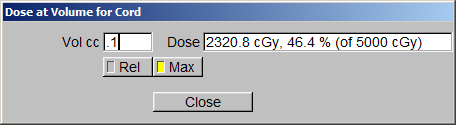
After clicking on the “Dose for a Given Volume” tab, a Volume Bar will appear. Type in “0.1” and the appropriate dose will appear next to it. This will give us a Hot Spot that occurs in the Volume that is .1cc or larger. Note: If you want the dose to be permanently reported in your spreadsheet, you can use “Create Hottest Point above Threshold Volume,” and put in .1cc. Plan Directives; Dose: 50 GY (2Gy X 25fx) 95% of PTV Receives 100% of Rx Nothing receives > 110% of Rx dose (if possible) Spinal Cord: .1cc < 25GY Rt Kidney: Max Point Dose < 18 Gy
|
 |